Have at least one collected Uma and a target Power or Weight upgrade in mind.
Distinguish the stand, upgrade plaque and collection pad
A placed Uma has its name and per-second income displayed above the stand. The plaque in front shows the level change and upgrade price; the green floor pad shows Cash waiting to be collected.
These controls do different jobs. Approaching the placed Uma exposes Pickup, while collecting Cash does not require removing the Uma.
- Select an owned Uma and place it on an empty stand.
- Read the income label above the placed character.
- Use the green pad to collect stored Cash and verify your wallet increased.
- Read the level and price on the upgrade plaque before deciding to buy.
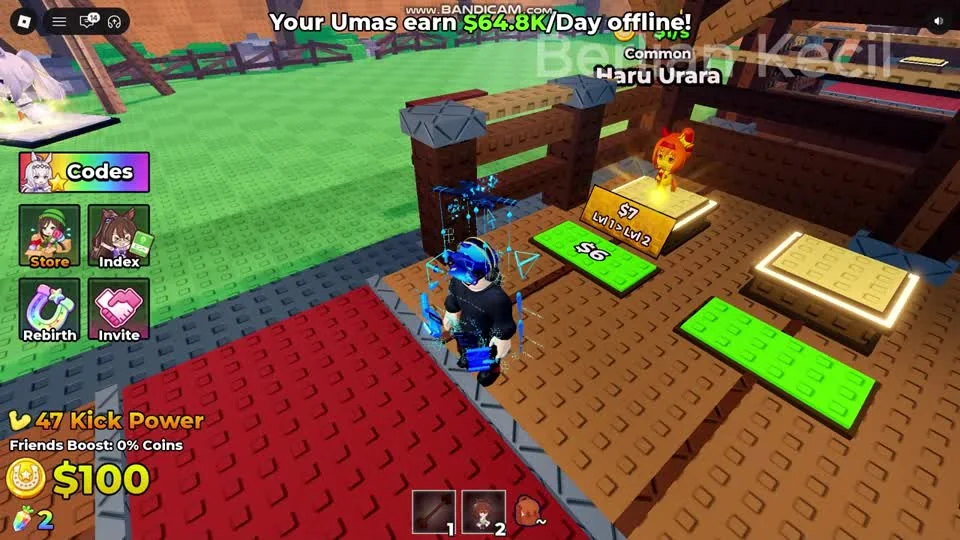
The character is placed, the upgrade plaque is on the stand, and stored Cash is on the green pad. Collect before comparing your wallet with a shop price.
Berlian kecil on YouTube · 2:00Measure collected income for an upgrade budget
The banner across the top advertises offline income, while the stand and wallet expose the amounts relevant to the current session. Use an observed wallet increase over a measured interval for the planner.
For a clean comparison, collect first, wait a measured interval without selling or buying, then collect again. Use the difference in wallet Cash and the actual time interval. Re-measure after changing the stand lineup or purchasing a stand upgrade.
Use Index to check the collection separately
Index groups the collection into Normal, Gold, Diamond, Plasma, Molten and Radioactive tabs in the recording. Selecting a tab changes the collection being shown; it does not place those Umas in your base.
Use Index to check collection progress, then return to the base stands for placement and income. An unlocked index entry and an occupied income stand are different checkpoints.
Questions before your next run
Do I need to pick up the Uma to collect money?
The shown base has a separate green Cash collection pad. Pickup is the interaction with the placed Uma itself.
Why does the offline-income banner not match my wallet?
The banner is an offline-income estimate. The wallet is spendable Cash; collect from the stands and use actual wallet changes when budgeting.
Watch the walkthrough
Follow the original gameplay alongside these steps. Menus and balance can change after a video is published.