Know the zone you currently reach and the upgrade options available in your game.
Read Power and Equipped in Weights Shop
Each visible weight card has an item name, rarity, weight, Power field and either a price or equipped state. The early recording shows Rusty Weight equipped alongside Regular Weight and Medium Weight cards.
Compare the Power value and the current Cash price on your own screen. Rarity color alone does not tell you whether you can afford or have equipped the item.
- Collect available Cash at your base before visiting Weights Shop.
- Read the current weight’s Equipped label and Power field.
- Compare a candidate’s Power and Cash price, then make a purchase only if it fits your budget.
- Confirm the intended weight is Equipped before training again.
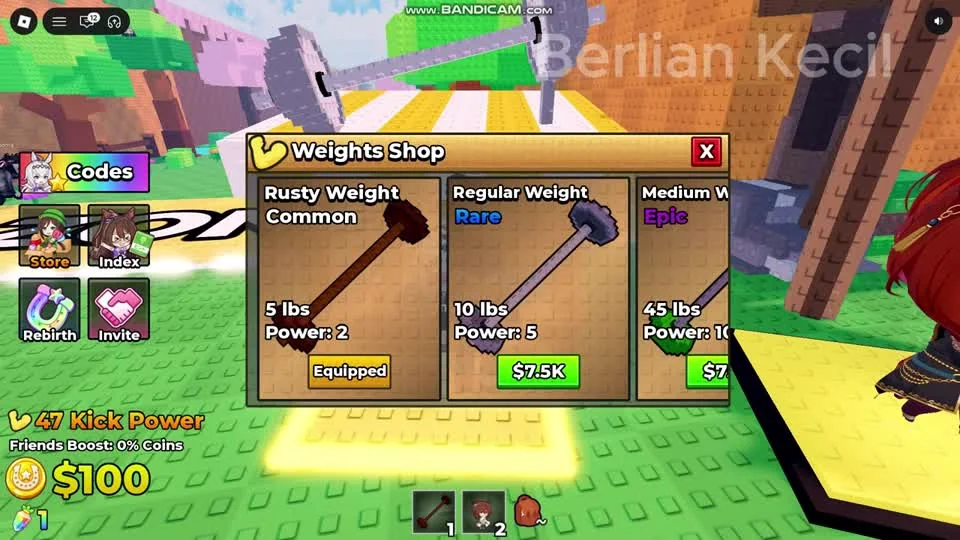
Read the card fields and Equipped state before spending. The displayed prices belong to this recorded session and are not a permanent price list.
Berlian kecil on YouTube · 1:00Keep Run Speed separate from Kick Power
Run Upgrades opens a Speed Upgrades panel displaying Run Speed and several increment choices. This panel is distinct from the Weights Shop and from the Kick Power counter.
Choose based on the action you want to improve: check weight training when working on Kick Power, and inspect Run Speed when working on movement around the base and shops.
Compare two kicks after one change
Use the same launch area before and after a training change, and note the reward or zone reached. Keep the equipment state visible so a forgotten equip step does not obscure the comparison.
- Read your current Kick Power and equipped weight.
- Train with that weight, then confirm Kick Power has increased.
- Return to the same KICK ZONE and perform the meter interaction.
- Compare the attempt before choosing another purchase.
Questions before your next run
Is Run Speed the same as Kick Power?
They are separate labels and controls in the shown game. Weights Shop displays Power; Run Upgrades displays Run Speed.
What should I check after buying a weight?
Reopen Weights Shop and confirm the intended item is marked Equipped, then train and watch Kick Power.
Watch the walkthrough
Follow the original gameplay alongside these steps. Menus and balance can change after a video is published.