Start at your assigned base and locate the Weights Shop and the marked KICK ZONE. Follow the action labels shown for your device.
Train with the equipped weight before the first kick
The early gameplay shows a weight selected in the hotbar and Kick Power increasing during training. The Weights Shop marks the Rusty Weight as Equipped, making it possible to distinguish the held training item from an Uma reward.
- Select the weight in your hotbar and use the training action.
- Watch Kick Power in the lower-left corner to confirm training is increasing it.
- Find Weights Shop when you want to compare a purchase; you do not need to buy before checking your first kick.
Use the meter at the KICK ZONE
The large KICK ZONE floor marking identifies the launch area. The footage shows a vertical meter and the instruction Tap to Kick, followed by a launch and a reward reveal.
Watch the displayed meter when using Tap to Kick, then check the landing and reward reveal before returning to your base.
- Move onto the marked kick area and start the displayed KICK interaction.
- When the vertical meter appears, use Tap to Kick on your device.
- Let the launch and reward reveal finish.
- Check the resulting Uma and return to your base to complete its placement.
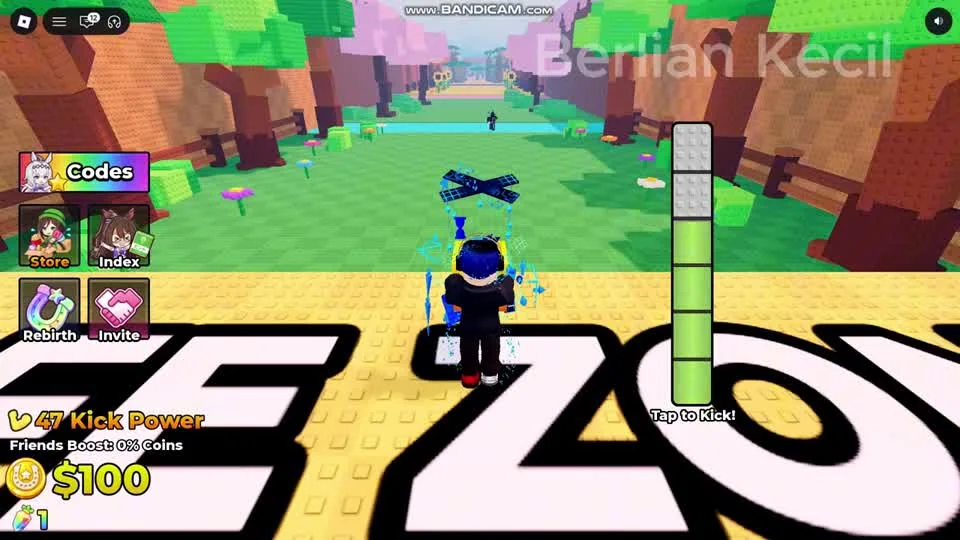
This is the kick interaction after reaching the marked zone. Follow the meter’s Tap to Kick prompt before waiting for the launch and reward reveal.
Berlian kecil on YouTube · 1:20Place the reward and collect its Cash
The base contains individual display stands and green pads in front of them. At 1:55 the player holds an Uma over an empty stand; by 2:00 the Uma is on display and its income label and upgrade control are visible.
- Select the new Uma in your hotbar and approach an empty stand in your base.
- Use the displayed placement interaction and confirm that the Uma remains on the stand.
- Inspect the per-second income label above it and the green collection pad below.
- Collect from the green pad and check your wallet before returning to Weights Shop.
Fix the missing part of the loop
If you are training but not launching, return to the marked KICK ZONE and its meter. If the Uma is still held or remains only in the hotbar, the stand placement is unfinished.
If the stand shows stored Cash but the wallet is short of a purchase, collect it first. If a weight has been bought, reopen the shop and confirm which item is marked Equipped.
Questions before your next run
Where do I start a kick?
Go to the KICK ZONE floor marking and follow the displayed KICK interaction and Tap to Kick meter.
Why is my new Uma not producing base income?
Check that you placed it on an empty stand. An Uma still held or only in your hotbar has not completed the stand-placement step.
Watch the walkthrough
Follow the original gameplay alongside these steps. Menus and balance can change after a video is published.